
We all know that parties are the best way to meet new customers, hosts, and teammates. Plus, in social selling, it’s one of the best ways to be … well … social! But it’s easy to get tired of the “same old parties.”
One option that’s quick, easy and effective is a “party” on Facebook Messenger.
Best Target Audience
This type of party is GREAT for people who are already familiar with your products and services, but it can work for everyone. It’s also great because once you are friends with your guests, that 1:1 engagagement with messenger will help KEEP you seeing each others’ posts!
Duration
I ran my party over the course of three days, but you could adjust this based on what works for you and your host.
- Day One – Host invites
- Day Two – Party
- Day Three – Follow Up/Prizes
Theme
Because it sounds a little strange to call a Facebook Messenger conversation a “party” I generally avoid this. Instead, I focus on the theme of the event. Examples of things that I’ve used are:
- Fall Preview (to preview a new launch/collection)
- Friendly Feud (fun question and answer game – great for individual engagement)
- Trivia
Really, you could use any of the same themes that you would in any other party; the key is just to remember that the engagement is different and adjust accordingly.
Step by Step Guide
- Host coaching (day zero) – Talk to your host about what this will look like, when it will run, and how to invite guests. IMPORTANT: Please ask them to talk to their guests before adding them to the chat. The guests will still have to “accept” and if they mass add people, it makes it really difficult to see who is really in the chat and who was just invited. We want quality over quantity! If helpful, you can provide some examples of how YOU would invite someone (reminding them, of course, to use their own words – whatever is comfortable for them!)
- Create host link (day 0) – Create your party link and send to the host. Let them know that they can still share it with friends who aren’t able to attend the event. Also share the host rewards they could earn!
- Plan out posts/download graphics (day 0) – because messenger is more “real time” than traditional parties, I always try to have it planned in advance with my graphics ready in a folder. If I’m not sure I’ll be home, I’ll also download them to my phone. Since you can’t schedule them in advance, this is important!
- Create a group chat (day 1) with your host and one other person. I used my own other facebook profile, but you could add a friend or mentor as well. They can be removed after you get a third guest added. You’ll need to make your host an admin so they can “invite” guests to the chat. You can also use this time to set a fun theme and even change the little icon at the bottom.
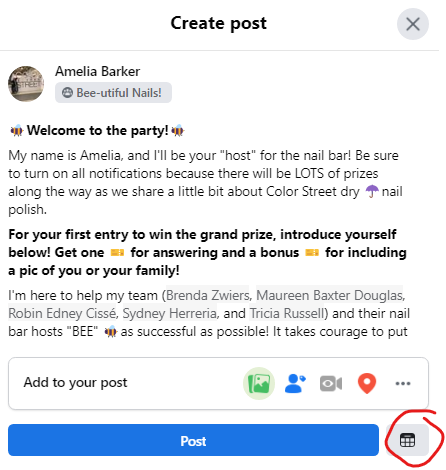
- Welcome Post (day 1) – Create a welcome post letting your guests know what to expect. I generally include an overview, the time of the “event” (whether that’s a game, a preview, or something else), and a call to action for a prize. I usually start by asking them to send me a friend request and a message to say hi!
- Send Friend Requests & Initial Messages (day 1) – Even though you’re asking them to send you a request, if they haven’t, I usually send them one right away. (They’ll get the point if they accept it.) I always send a message to introduce myself and ask them a question. (Have they used our products? How do they know the host? Etc.)
- Send build-up questions (day 2). These can vary depending on what’s going on. I start with a point recap from the night before, remind them about the prize, and remind them to send or accept my friend request and send me a PM to catch up. I then post 3-4 questions throughout the day for participants to earn points. Examples include:
- Poll about product knowledge/favorites
- Roll Call (how do you know the host)
- Product Posts with questions
- Sample Requests
- etc.
- Main Event (day 2) – I run this like I would a game night – fast paced for 30 minutes to one hour, depending on content. Depending on the tone of the group, you can have people answer in the chat; however, I HATE notifications and I find it gets hard to follow, so I USUALLY have people send their answers during the live portion directly to me instead of to the chat. (Again, this helps the algorithm, PLUS it allows me to have more personal conversation with the guests individually. For this and the build up questions, you can usually use graphics that were designed for a traditional online party.
- If I’m doing a launch/preview event, I’ll share the new products and ask people to rate them. I vary the responses between:
- Rating on a scale of 1-10
- “Liking” the picture with an emoji to show how they feel about it
- Using the emoji at the bottom if they like it
- If I’m doing a game like trivia or friendly feud, I’ll ask the question in the chat and allow X minutes for them to respond to me individually. I give the first person to respond 2 points, and everyone else who is correct/on the board a point. That way there is a speed element as well as quality. After the time has passed, I’ll tag who was first and everyone who got it right. I will also tell them realtime when they answer too and include the answer graphic. (I usually don’t post this realtime in the chat so at the end I can give people time to “catch up.”
- Game Night Special (day 2): After a few posts, I’ll offer a game night special. This could be free shipping, gift with purchase, etc. (but something to encourage them to make a purchase.)
- Join My Team – About 2/3 of the way through the party I’ll post a “join” graphic and offer a point for sending me a PM with a question about my business. This is usually multiple points for participating.
- Host Post: Near the end, I’ll offer a party booking game or a prize for hosting.
- Join my VIP: I’ll wrap up by offering some special promo or points for joining my VIP Group.
- If I’m doing a launch/preview event, I’ll share the new products and ask people to rate them. I vary the responses between:
- Thank You/Extend (day 2): I am usually tired AND want to give people a chance to catch up if they couldn’t play live, so I usually say I’ll be back the next day to post the prize. I’ll offer bonus points for purchasing from the host’s link.
- Follow Up Messages (day 3): I let people know when I’m going to give out the prizes, and if they haven’t responded to the prior posts, I’ll chat with them about the opportunities:
- Join: Thank you so much for joining (name’s) fall preview! I hope you had fun. I really enjoyed our chats and wondered – have you ever thought about becoming a stylist yourself? (Then either have the convo, overcome objections, or move on to the next bullet)
- Host: If the guest isn’t interested in joining: That’s fine! You can actually earn quite a few freebies just by being a host like (host name) did. We could do a similar event for you next week if you’d like to try to earn some free and discounted (products they were interested in!)
- Buy: If they don’t want to join/host their own party – no worries! Well I’m going to leave (host’s) link open until _____ (date.) Did you want me to send you the link so you can do a little window shopping? Remind about any bonus points they could get with the purchase
- Winner! (day 3) draw for any prize winners and send out prizes.
- VIP/Party Closed (day 4): The next day, post a “this party is closed” or “the end” graphic and thank everyone for their participation. Send individual messages thanking them and asking if you could send a link to your VIP group (if they haven’t already joined.)
- Thank your host! Regardless of the outcome of the party, you probably met new people, made new friends, and had fun! So be sure you thank your host. If applicable, you can also let them know how close they are to earning rewards/reaching the next level and encourage them to share their link with friends and family!

 thegoldthebeautiful.com